


Digital Clock & World Weather
3.91.63K Reviews
App Specs
- Version
- 9.01.4
- Updated On
- License
- Free
- Downloads
- 1,000,000+
- Developer
- MACHAPP Software Ltd
- Categories
- Weather
- Platform
- Android
Screenshots
 Analysis by AppCompare
I reach for Digital Clock & World Weather most when my day depends on two quick checks: what time it is somewhere else, and whether the weather at home will change my plans. Keeping those details together can be useful, but it only helps if the information is easy to read and fits the way I use my phone. My impression is that this app works best as a glanceable home-screen companion, rather than a replacement for every clock or forecast tool.
A useful starting point for busy days
The app is a free weather app from MACHAPP Software Ltd, and its central appeal is the pairing of local forecasts with a digital clock widget. It has a 3.9 average from around 31,000 ratings, and more than a million installs. That gives a prospective user a sense of its reach, though ratings alone can’t tell you whether its layout will suit your habits. The age rating is Everyone, so it is broadly suitable for general use.
I’d consider it when I want the time and a weather snapshot visible without opening separate apps. Someone who regularly talks with family abroad, coordinates with colleagues in other regions, or simply likes a prominent digital clock may find that combination especially practical. If I only need a basic alarm or a quick local forecast, the clock and weather apps already on my phone may be enough.
From setup to a glanceable routine
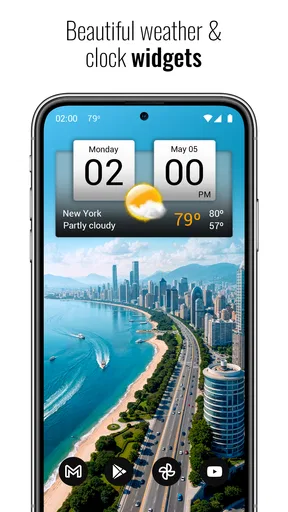
The most natural workflow is to set up the clock and widget, choose a look that is easy to read, and then use the home screen as a quick checkpoint before heading out. The 4×2 digital widget is the clearest part of the app’s identity: it gives the clock a visible place on the screen while keeping weather close at hand. I’d treat the widget as a planning aid, not as a substitute for opening a fuller forecast when the details matter.
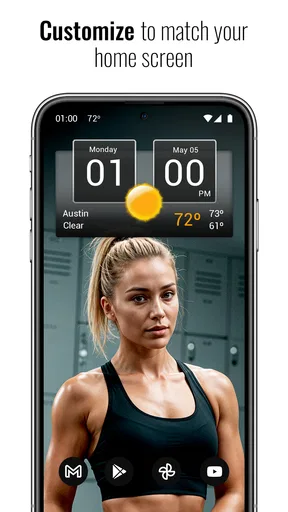
Customization can help here, but it also asks for a little trial and error. I’d pick readability over decoration first, especially if the widget will sit among several busy home-screen icons. A glanceable clock should answer its basic question immediately; if a theme makes the display harder to scan, it isn’t the right choice for everyday use.
The app is listed at version 9.01.4 and requires Android 7.0 or later. That makes checking device compatibility a sensible first step for anyone using an older phone. It is free to start, with in-app purchases ranging from $4.99 to $15.99 per item, so I’d look at the purchase details in the app before deciding whether any paid option is worthwhile for my own routine.
How the pieces hand off to one another
What I like about a combined clock and weather setup is the small handoff from time awareness to a decision. I can notice that a call is approaching, then check the local conditions before leaving home, without having to remember which app to open first. For international scheduling, separate city clocks can also reduce the mental arithmetic of converting times while I’m arranging a conversation.
Worth Reading Before You Choose

EA SPORTS FC Mobile 26 Is a Bigger Football Game, but It Takes Time

Flipboard Shows What News Apps Must Do Beyond the Feed

Switching to Android Auto Means Rethinking Your Driving Routine

Google Calendar Makes a Crowded Week Easier to Manage

Ludo King Makes the Most of the Minutes Between Plans

Baby Panda World Brings Quick Play to Modern Phones, but Its Game Library Feels Busy
That convenience has limits. A home-screen widget is most useful when it shows the information I need at a glance; it can’t replace a detailed forecast or my calendar. I’d still confirm the time in the calendar invitation before an important meeting, and check the forecast inside a weather app when rain, temperature changes, or a longer outing could affect what I pack. The widget makes the first check easier, not every later decision automatic.
Where the routine can break down
Compared with using a phone’s built-in clock and a separate weather service, this app’s advantage is having both functions in one place. The trade-off is that a combined display may not be the best fit if I want the most detailed weather presentation, an especially minimal clock, or a workflow already centered on another home-screen setup. I’d choose based on what I actually check every day, rather than adding another app just because the combination sounds convenient.
There is also a practical distinction between seeing a clock on the home screen and relying on it for a high-stakes reminder. I wouldn’t assume that a widget can replace a dedicated alarm or calendar notification, particularly when missing a call would have consequences. For that kind of task, I’d use the alert system I already trust and let the clock serve as a visual backup.
If I were deciding whether to keep it, I’d give the widget a few ordinary days: check it before leaving, use it when arranging a call across time zones, and notice whether it saves enough taps to earn its home-screen space. That is a better test than judging it from its first screen. The app’s usefulness depends less on how many options it offers than on whether its clock-and-weather glance becomes part of a real routine.
First Impressions
At first glance, the Digital Clock & World Weather app offers a clean and intuitive interface. It’s like having a sleek digital clock right on your phone, but with a bonus: it tells you what the weather’s doing as well. I’ve got to say, that’s pretty handy when you’re planning your day.
The setup process is straightforward. You can customize the clock’s appearance with various themes and widgets, which is fantastic if you like a bit of personalization. Plus, the app supports multiple time zones, which is a lifesaver if you’re frequently communicating with folks across the globe.
Features Galore
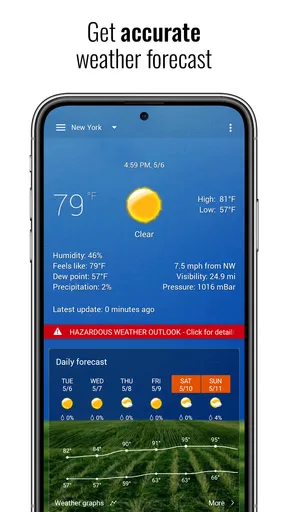
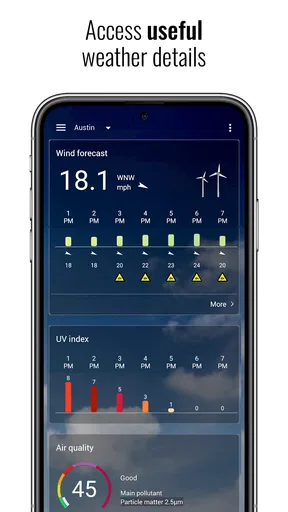
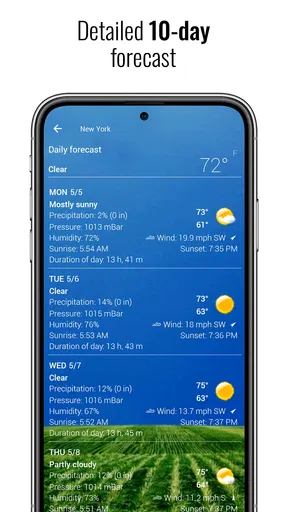
One of the standout features is the weather forecast. Not only can you see the current weather, but you also get a detailed forecast for the next few days. It’s like having a pocket-sized meteorologist. Whether it’s going to rain or shine, you’ll be prepared.
The app also includes an alarm feature. Now, I know what you’re thinking: “Another alarm app?” But hear me out. This one lets you set alarms based on different time zones, which is a game-changer for those early morning meetings with international teams. No more mental gymnastics trying to calculate the right wake-up time.
Why It Stands Out
So, what makes this app different from the million other clock and weather apps out there? I think it’s the integration of time zones with weather updates. It’s like the app knows exactly what you need before you do. Plus, the ability to customize the look and feel is a nice touch.
Another feature I love is the ability to add multiple widgets to your home screen. You can have different clocks for different cities, all with their respective weather forecasts. It’s like having a dashboard for your life, right at your fingertips.
Real World Use
In practice, the app has been a solid performer. I’ve used it to keep track of time zones when scheduling calls with colleagues in Europe and Asia. The weather updates have helped me avoid getting caught in unexpected showers more times than I can count.
One thing I particularly appreciate is how lightweight the app is. It doesn’t bog down my phone or drain the battery, which is a huge plus. The last thing I need is an app that slows me down when I'm trying to speed up my day.
Final Thoughts
Overall, Digital Clock & World Weather has quickly become one of my go-to apps. It’s practical, easy to use, and genuinely helpful in managing my time and weather expectations. Whether you’re a frequent traveler, a busy professional, or just someone who likes to stay on top of things, this app is worth checking out.
If you’re ready to take control of your schedule and stay ahead of the weather, give this app a try. You can download it from your usual app store, and it might just become your new favorite tool for navigating the chaos of daily life.
Pros
- Intuitive and user-friendly interface.
- Customizable clock and weather widgets.
- Accurate
- real-time weather updates.
- Supports multiple world time zones.
- Battery-efficient design.
Cons
- Limited customization on free version.
- Occasional ads can be intrusive.
- Requires constant internet for updates.
- May lag on older devices.
- No built-in alarm feature.
FAQs for Digital Clock & World Weather
What features does Digital Clock & World Weather offer?
Digital Clock & World Weather provides a range of features including a customizable digital clock display, real-time weather updates, and forecasts for multiple locations worldwide. Users can personalize the appearance with various themes and widgets, and receive alerts for severe weather conditions, making it a comprehensive time and weather app.
Is Digital Clock & World Weather free to use?
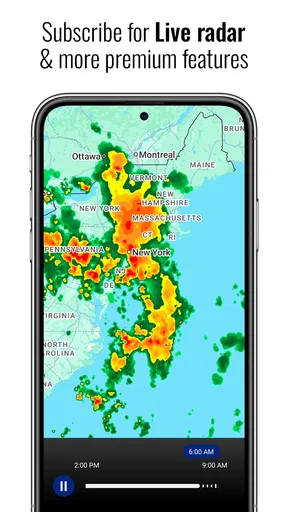
Yes, Digital Clock & World Weather is free to download and use. However, the app may offer in-app purchases or premium features that enhance functionality, such as additional themes or ad-free usage. Users can choose to upgrade for a more personalized and seamless experience.
How accurate is the weather information provided by the app?
The app sources its weather data from reliable meteorological services, ensuring that the information is as accurate and up-to-date as possible. Users can rely on the app for current conditions, hourly forecasts, and extended weather predictions. However, as with any weather service, slight discrepancies can occur.
Can I customize the widget appearance on my home screen?
Yes, Digital Clock & World Weather allows extensive customization of its widgets. Users can choose from a variety of themes, colors, and sizes to match their home screen aesthetics. The app also lets you adjust the clock and weather information displayed, ensuring a tailored experience.
Does Digital Clock & World Weather support multiple locations?
Absolutely, the app supports tracking weather for multiple locations. This feature is particularly useful for users who travel frequently or wish to keep track of weather conditions in different cities. You can easily switch between locations and view detailed weather forecasts for each.


